
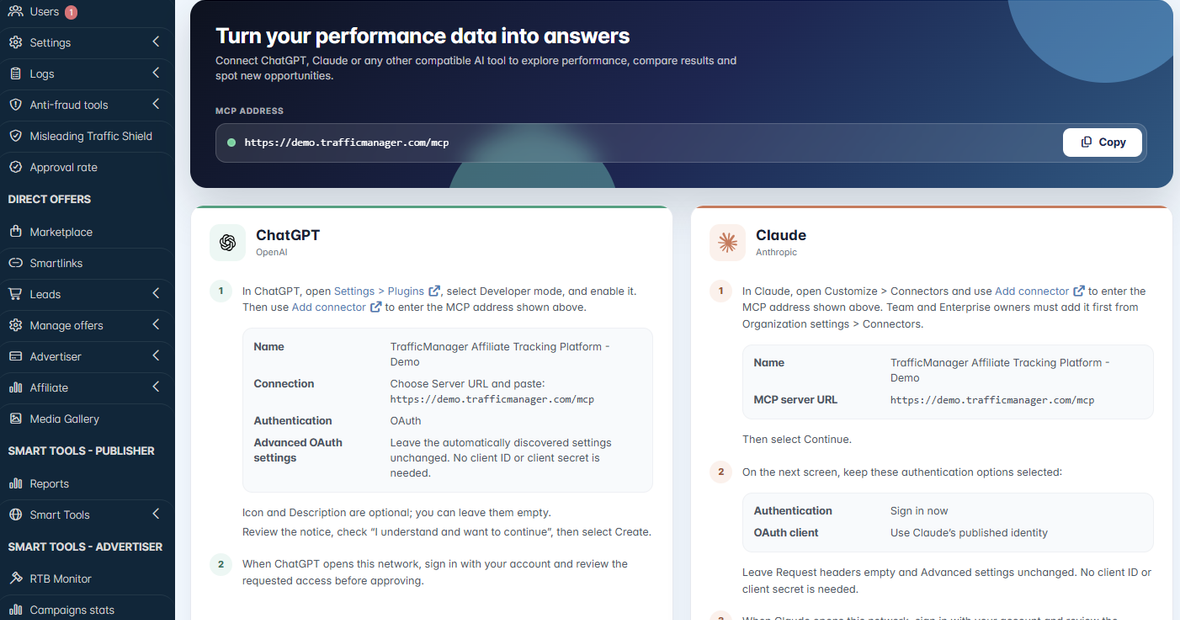
Dear partners, we have huge news from TrafficManager. From now on, all users of our platform, including admins, affiliate managers, advertisers, operators, and affiliates, can connect their TrafficManager accounts directly to ChatGPT or Claude through MCP.
This allows them to ask questions and perform advanced analyses of their TrafficManager data using natural language, without exporting reports or manually searching through multiple sections of the platform.
The future of affiliate management will not be based only on dashboards, reports, and spreadsheets. AI will become part of the daily work of affiliate managers, affiliates, advertisers, operators, and network owners.
This doesn’t mean that AI will replace their experience, relationships, or commercial decisions. It means that they will be able to access information faster, identify problems earlier, and make better decisions using the data already available to them.
What is an MCP connection?
MCP stands for Model Context Protocol.
In simple terms, it allows an AI assistant such as ChatGPT or Claude to connect to another platform and use the information available there when answering questions. Once connected to TrafficManager, users can ask questions about their platform data in the same way they would speak to a colleague or data analyst.
Instead of opening several reports, applying multiple filters, comparing different periods, and trying to connect the numbers manually, they can start with a simple question:
“What happened on the platform today?”
The AI assistant can then analyze the available TrafficManager data and provide a clear summary based on the user’s request and existing permissions.
Available across all TrafficManager user levels
Our MCP connection is not limited to the platform administrator. It is available across all user levels, allowing each person to use AI according to their role and the information they are already authorized to access.
Admins
Admins can analyze in real time what is happening across the platform, compare different periods, identify important performance changes, review their tasks, and integrate artificial intelligence into their daily routine.
For example, an admin can ask:
- Which affiliates reduced their traffic during the last seven days?
- Which offers received more clicks but converted less efficiently?
- What were the most important changes compared with the previous month?
- Are there missing or unattributed postbacks that require attention?
- Which tasks should be prioritized today?
Affiliate managers
Affiliate managers can better monitor affiliate traffic, identify offers losing performance, discover which affiliates stopped sending traffic, and decide where a follow-up is needed. Instead of manually checking every affiliate account, they can ask the platform to highlight the relationships or campaigns that require their attention.
This does not replace the affiliate manager’s decision. It gives them faster access to the information needed to make that decision.
Affiliates
Affiliates can analyze their own traffic, compare offers or campaigns, identify performance changes, and understand which parts of their activity are generating better results.
They can ask questions such as:
- Which offers performed best for my traffic this month?
- Where did my conversion rate decrease?
- Which campaigns generated more revenue than last month?
- Did any of my postbacks fail during the selected period?
Advertisers and operators
Advertisers and operators can review the performance of their offers, campaigns, conversions, registrations, deposits, and other events available to their accounts.
Depending on the data and permissions available, they can compare campaigns, investigate performance changes, and better understand the traffic received from the network.
From advanced reports to simple conversations
Finding which affiliates recently reduced their traffic and on which offers can now take only a few seconds. You no longer need to start by digging through advanced dashboard statistics and trying to understand the numbers manually.
You can simply ask:
“Which affiliates stopped sending traffic yesterday, and to which offers?”
Other possible requests include:
“Compare this month with last month and highlight the biggest changes.”
“Which offers gained traffic but converted less efficiently?”
“Show me the campaigns where the conversion rate dropped during the last seven days.”
“Help me investigate the missing postbacks for this offer.”
“Analyze the available platform logs related to this integration.”
Advanced reports, comparisons between different periods, highlights of the most important changes, and possible next steps to increase performance are now just a request away. The AI assistant can help organize and explain the information. The final commercial and operational decisions remain with the user.
Every user connects through their own TrafficManager account.
The MCP connection follows the existing role and access permissions inside the platform. Connecting an AI assistant does not give the user access to information they could not already view through their TrafficManager account.
An affiliate can work with the data available in their affiliate account. An affiliate manager can access the affiliates and information assigned to them. Advertisers and operators can work with the information available for their offers and campaigns, while admins can access the broader platform data permitted by their account.
This makes the connection useful across the company without removing the access controls already configured inside TrafficManager.
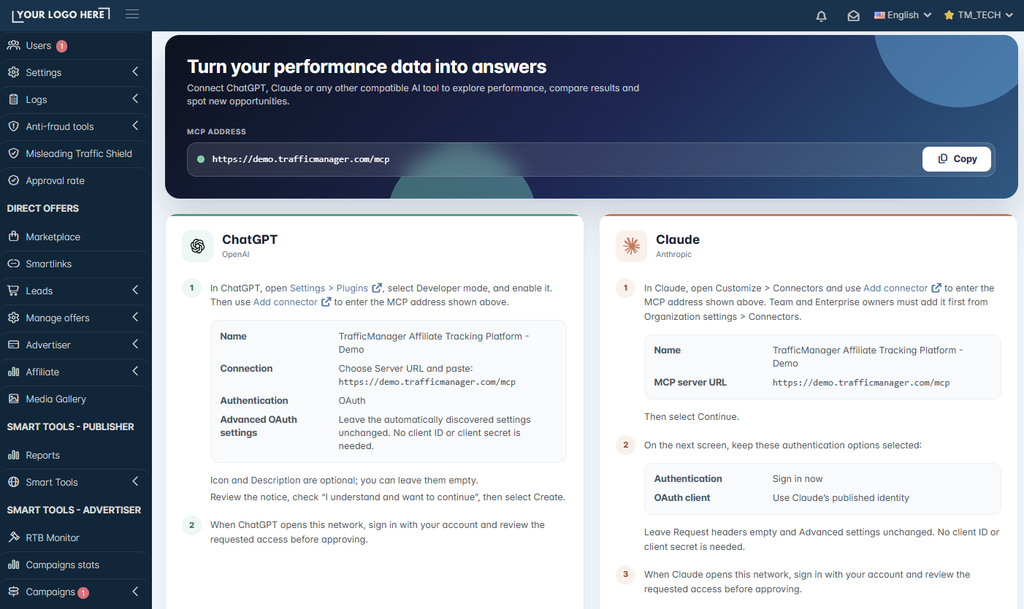
Connecting takes only a few minutes, and no client ID, client secret, or complicated technical setup is required.
Bringing AI into daily affiliate operations
AI agents are already becoming part of daily business operations, so taking this step was a natural evolution for TrafficManager. We don’t want artificial intelligence to be just another badge added to our website or another feature mentioned in a presentation.
We want it to solve real problems.
We want our clients to spend less time searching for information, notice important changes faster, investigate problems more easily, and make better decisions using the data they already have.
We believe technology providers should not only collect and display data. They should also make the best technologies available to their clients and help them obtain better outcomes from that data.
This is how we see our role at TrafficManager: keep building, keep integrating, and give our clients better ways to manage and grow their businesses.
The dashboard gives you the data. Now you can also have a conversation with it.
Start using the TrafficManager MCP connection
If you already use TrafficManager, follow the instructions available inside your platform to connect your account to ChatGPT or Claude.
If you would like to see how TrafficManager can help you launch, manage, and grow your affiliate program or network, book a demo with our team:
#AffiliateMarketing #AffiliateTracking #MCP #ArtificialIntelligence #ChatGPT #Claude #TrafficManager